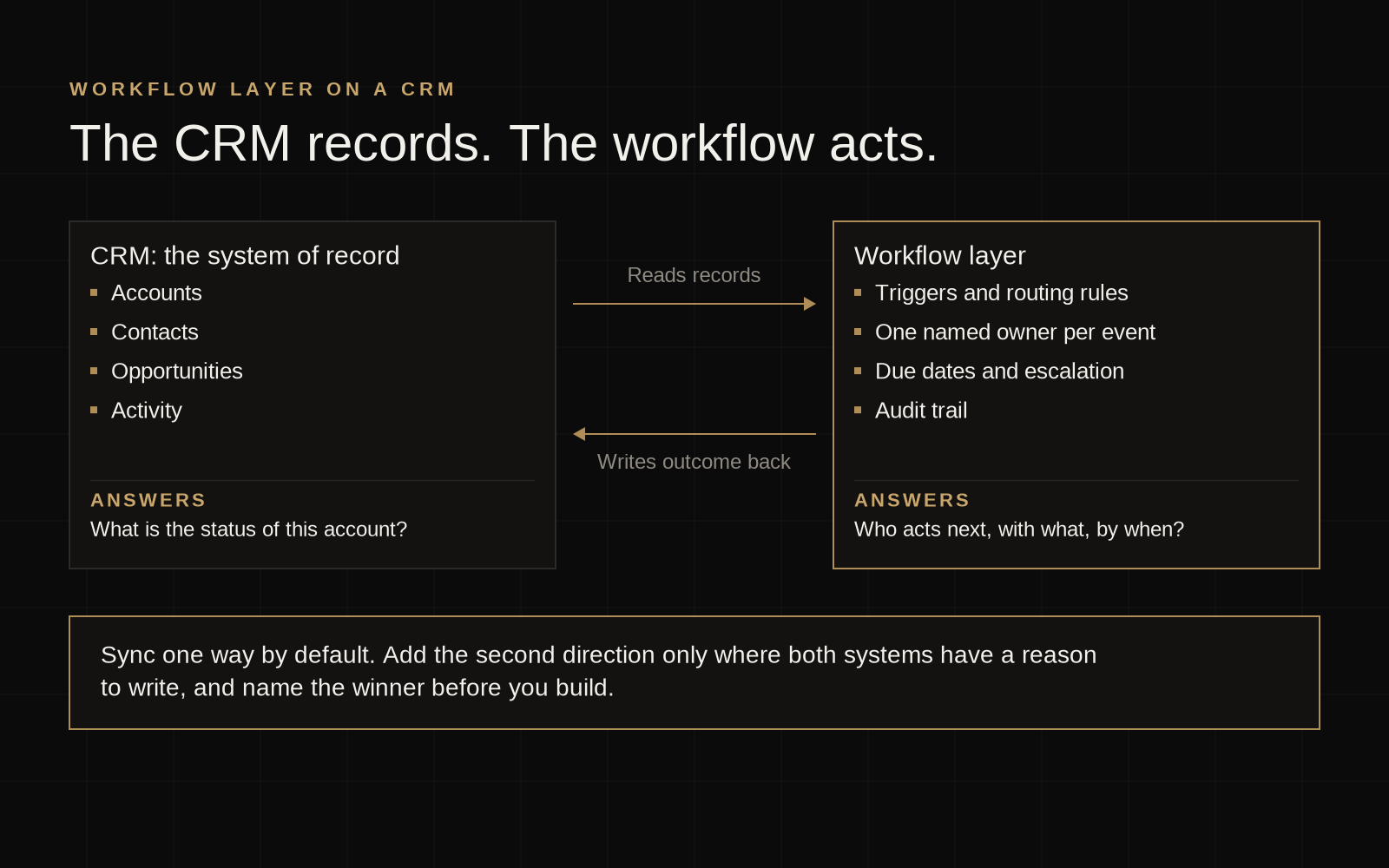
Build a workflow layer on top of your CRM when the work between records matters more than the records themselves: when the question is who acts on which account next, with what context and by when. The CRM keeps the system of record. The workflow layer reads from it, decides the next action, routes it to a person and writes the outcome back.
If you are the head of sales operations or the CIO, you own CRM adoption, data quality and the speed at which a lead or an account turns into the next action. This guide shows when a workflow layer pays for itself, what to build first, and the integration rules that keep both systems healthy.
A CRM stores records. A workflow decides what happens next.
A CRM holds accounts, contacts, opportunities and activity. It answers questions like "what is the status of this account" and "who was the last person to contact them".
A workflow answers a different set of questions. Which account needs action today? Who is the right person to act? What do they need to see? What happens if nobody acts by the due date? These questions need rules, dates and routing, and a database of records has no built-in answer to them.
Companies often try to answer them with CRM custom fields, reports and reminders. That works for a team of ten with simple needs. It strains as the number of products, rules and people grows.
Proof from my own work
At Level 3 Communications, I was lead developer on the original sales workflow application. It carried more than $1 million in pipeline each quarter. It was built to move work between people.
At Slalom Consulting, I designed and built a sales workflow application with Salesforce integration for a Fortune 500 client. It cut the client's sales-data processing time. The work sat in the workflow application, connected to the CRM.
Later, the enterprise sales platform I architected at Level 3 and Lumen grew from $0 to $500 million in four years, with renewal systems spanning more than 1,000 product lines. The lesson from all of it is the same: the record system and the workflow system do different jobs, and each does its job better when the two are kept separate.
Signs you need a workflow layer
Look for these signals. Three or more is a strong case.
| Sign | What you see |
|---|---|
| Reminders pile up | Reps ignore CRM task lists because there are too many and none carry context |
| Rules live in people | One person knows which accounts get special terms, and nobody else does |
| Handoffs lose information | Work moves from sales to finance to legal and the context is retyped each time |
| Reports describe the past | Dashboards show last month, and nothing tells a rep what to do today |
| Custom fields keep growing | The CRM has hundreds of fields and new ones appear each quarter to track process |
| Spreadsheets run the real process | A shared sheet holds the renewal calendar or approval log |
| Approval waits dominate | Quotes and deals sit in inboxes for days |
If you recognize only one or two, fix the CRM configuration first. A workflow layer adds a system to maintain, and the cost needs a clear payoff.
What to build first
Start with one event in one segment. The best first target is the event with a visible date and a clear owner, which makes renewals a common choice.
- Pick the event. Renewals ending in the next 120 days for your largest segment is a sound start.
- Define the trigger. The rule that fires the work, such as a contract end date minus the notice window plus a margin.
- Assign the owner. One named person per account, read from the CRM owner field.
- Attach the context. Pull the account summary, terms and history into a single view for the owner.
- Set the due date and the escalation. If nobody acts by the due date, the work goes to the manager with the stakes stated.
- Write the outcome back. The result goes to the CRM, so reports there stay accurate.
A narrow first version teaches you the real shape of the work. Add the next event once the first one runs: rerates, upsells and reactivations all follow the same pattern. The pillar guide on renewal and upsell systems describes the full set.
Integration principles
How the two systems connect decides whether the project works. Follow these principles.
The CRM stays the system of record
Accounts, contacts and opportunities live in the CRM. The workflow layer holds only what the CRM cannot: workflow state, routing rules, due dates and the audit trail. Your sales team keeps working in the tool they know, and your data owners keep one source for account facts.
Choose the sync direction per field
Decide field by field whether data flows one way or both ways.
| Data | Direction | Reason |
|---|---|---|
| Account name, owner, contacts | CRM to workflow | The CRM is the source |
| Contract end date and terms | Contract system to both | One source, copied outward |
| Workflow status and next action | Workflow to CRM | The workflow owns it |
| Outcome of a renewal | Workflow to CRM | Reports in the CRM need it |
| Notes from reps | CRM to workflow | Reps write them in the CRM |
One-way sync is simpler and safer. Use two-way sync only for fields where both systems have a real reason to write, and define which side wins in a conflict before you build.
Every field has one owner
Write down, for each shared field, which system owns it and which person owns the definition. Fields without an owner drift. Two systems writing the same field with no rule produce silent overwrites.
Rules sit in data
Routing rules, thresholds and deadlines belong in tables a business person can read and change, with an effective date and a history. That keeps the workflow layer from turning into a second pile of custom code. The guide on pricing and renewal rules across many product lines explains how to structure them.
Build for failure
Assume the CRM will be unavailable at some point, or an update will fail halfway. Decide in advance what the workflow layer does: queue the write and retry, flag the account for manual review, and never lose the outcome. In my earlier work on message-switching software, the lesson was to assume every component will fail and decide in advance what happens when it does.
The Monday procedure
- List the five workflows your team runs in spreadsheets or inboxes today.
- Score each against the signs table and pick the one with the most signs.
- Write down its trigger, owner, context, due date and escalation rule.
- List every CRM field the workflow needs to read, and every one it needs to write.
- For each shared field, name the owning system and the sync direction.
- Build the narrow version for one segment, and run it with a person reviewing every action.
- Compare days from trigger to action before and after.
What goes wrong
- The workflow layer becomes a second CRM. Keep accounts and contacts in the CRM. If the new system starts storing contact details, you will have two versions of the truth.
- Two-way sync everywhere. Every extra write path adds conflict cases. Default to one way and add the second direction with a stated reason.
- Reps are asked to enter data twice. The workflow should read what the CRM already has. Any duplicate entry will be skipped under pressure.
- Nobody owns the rules. Rules change as prices and policies change. Give each rule an owner and review them on a calendar.
- The first build is too broad. A project that covers every event and every segment ships late. Choose one event.
- The audit trail is added later. Record who or what made each routing decision from the first day, since retrofitting it is harder.
- No measure of success. Pick days from trigger to action before launch, and record the baseline.
Questions leaders ask
Should we customize the CRM instead?
Customize it first for simple needs: a field, a report, a basic automation. Build a workflow layer when the logic involves many rules, dates and handoffs across teams, since a long list of custom objects and automations becomes hard to understand and hard to change.
Will this interfere with our CRM contract?
Most major CRMs expose standard interfaces for reading and writing records. Check your vendor's terms and API limits with your administrator early, and design the sync to stay inside them.
How long until the first version is live?
A narrow first version, covering one event in one segment, is a matter of weeks. The pace depends on how clean the contract and owner data are, and the 30-Day Leverage Pilot is built around a first version in that window.
Who maintains it after launch?
Sales operations owns the rules and the measures, and IT owns the integration. Agree on both names before launch, and review the rules table monthly.
The 30-Day Leverage Pilot runs one lever through four weeks: find it, map the constraint, build and test, then go live with humans first, with a decision on day 30 to continue or stop. Read how it works on the Pilot page.