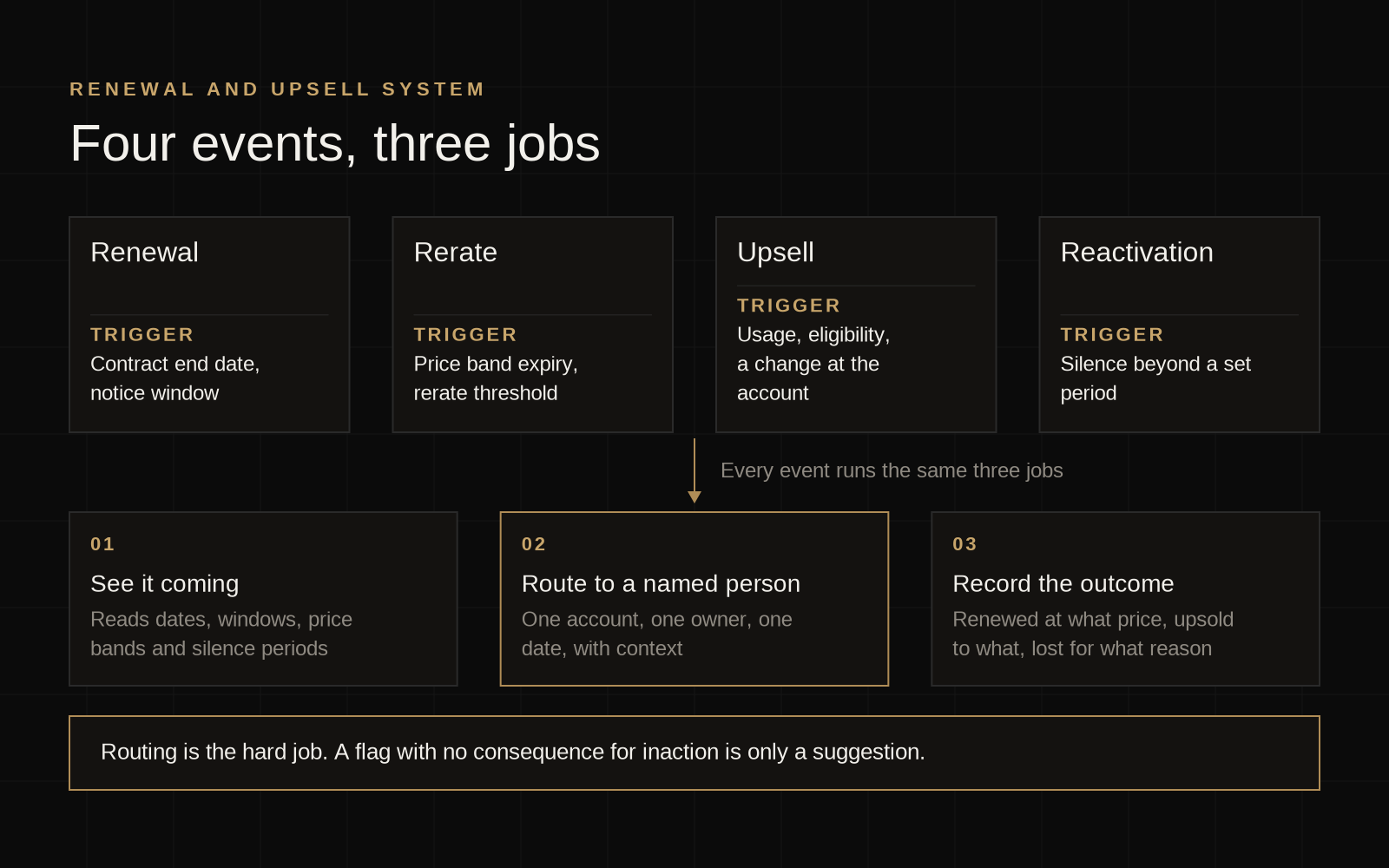
The money inside your existing customers sits in four events: renewals, rerates, upsells and reactivations. A renewal system captures it by seeing each event before it happens, routing it to a named person at the right moment with the account context attached, and recording what happened. Companies that run this on spreadsheets and memory lose revenue every month.
If you are the CEO or the chief revenue officer, you own two numbers that this system moves: gross retention and expansion revenue. This guide shows what the system consists of, what data it needs, where AI helps, and how to measure it.
Why existing customers come first
A company can grow in three ways: more customers, a larger transaction with each customer, and more frequent transactions or a longer relationship. The essay There Are Only Three Ways to Grow covers the arithmetic of how they multiply.
Most revenue teams spend nearly all their energy on the first way. It is the most expensive, because it requires convincing a stranger who has never heard of you. The second and third ways work on customers who already know you, already trust you and already pay you. The cost of reaching them is a fraction of the cost of finding a new buyer.
I learned this at Level 3 Communications and Lumen Technologies. I architected the enterprise sales platform that went from $0 to $500 million in four years. The revenue came from renewals, rerates and upsells, routed to the right person at the right moment, across renewal systems spanning more than 1,000 product lines. I built the first version myself, then hired and led the team that scaled it.
The company already owned the account base. What it lacked was a system that worked it.
The four revenue events
Every dollar that comes from an existing customer arrives through one of four events. Each has a trigger you can see in advance.
| Event | What it is | Trigger you can see in advance |
|---|---|---|
| Renewal | The customer extends a contract that is ending | Contract end date, notice window |
| Rerate | The price or terms on an existing agreement are reset | Price band expiry, rerate threshold, market change |
| Upsell | The customer buys more, or buys a higher tier | Usage, product eligibility, a recent change at the account |
| Reactivation | A customer who went quiet buys again | Silence beyond a set period after past purchases |
The essay The Revenue Sitting in Your Dormant Accounts goes deeper on the fourth event. The same logic applies to all four: the event is visible long before it lands, and the revenue goes to whoever acts first with the right context.
What a revenue system does
A revenue system performs three jobs, in this order.
- It sees the event coming. It reads contract dates, notice windows, price bands and silence periods, and it raises a flag early enough to act.
- It routes the event to a named person. One account, one owner, one date, with the context attached: contract terms, history, open issues and the suggested offer.
- It records the outcome. Renewed at what price, upsold to what, lost for what reason. The record feeds the next cycle.
Each job sounds simple. The failures come from skipping one of them. Companies that see the event but route it to a shared inbox get no action. Companies that route it to a person without context get a generic email. Companies that skip the record repeat the same losses every year.
The routing job is the hard one
Seeing an event is a database query. Recording an outcome is a form field. Routing is where revenue is won or lost, because it decides who acts, when, and with what in hand.
A good routing rule answers four questions. Who owns this account today? What is the right action for this event? What does that person need to see before they act? What happens if they do nothing by the due date?
That last question is the one most systems omit. A flag with no consequence for inaction is a suggestion. Build an escalation path from day one: if the owner has not acted by a set date, the event goes to their manager with a note on what is at stake.
The data the system needs
You do not need a clean data warehouse to start. You need six fields per account, in one place, with an owner for each.
| Field | Why it matters | Typical source |
|---|---|---|
| Contract end date | Sets the renewal trigger | Contract system or CRM |
| Notice window | Shows when the customer can leave | Contract text |
| Current price and terms | Shows whether a rerate is due | Billing or contract system |
| Account owner | Decides where the event is routed | CRM |
| Product lines held | Shows what the account could add | Billing or order system |
| Last human contact | Shows whether a real conversation happened | CRM activity log |
Start with what you have. A system that works on four of these fields and flags the gaps in the other two is useful in week three. A system that waits for perfect data is never built.
The data also needs the same discipline as any shared company knowledge: each fact has a source, an owner and a date. Our page on the company brain describes that discipline.
Where AI helps, and where rules must be deterministic
AI belongs in the parts of the work that involve reading and writing. Rules belong in the parts that involve money and commitments.
Where AI helps
- Reading contracts and account history. Extracting end dates, notice windows, auto-renewal clauses and special terms from documents that were never entered into a database.
- Drafting the outreach. Preparing a first draft of the renewal note or upsell proposal from the account history, for the owner to review and send.
- Flagging exceptions. Spotting the account whose history does not fit the standard pattern, such as a recent complaint, a sharp drop in usage or a new decision maker.
Where rules must be deterministic
- Pricing and discount limits. The system applies a rule, and the rule gives the same answer every time.
- Eligibility. Which customers can be offered which products is a fact in a table.
- Approval thresholds. What a salesperson can offer alone and what needs a second signature.
- Dates and notice windows. Calculated by code from the contract record.
The reasoning is plain. A drafted email that is slightly off costs you a rewrite. A price quoted wrongly costs you margin or a customer, and you may be bound to it. Guardrails belong in code, with humans reviewing the AI output first and a record of every action.
This is the pattern from the AI Leverage Blueprint: engineer for failure, and decide in advance what happens when a component gets it wrong.
How rules live in data
At Level 3 and Lumen, renewal systems spanned more than 1,000 product lines. Each line had its own terms, notice windows and thresholds. The rules for each product line were held in data instead of code.
That decision made the platform scalable. The system's logic was built once. Adding a product line meant adding rows to a table, with no new software to write or test. The sibling guide on pricing and renewal rules across many product lines explains the pattern in detail.
Build the system in order
A team can stand up a first version in a few weeks. The sequence matters more than the tooling.
- Audit the current state. Pull every contract with an end date in the next 12 months and see what actually happens to each. The guide on how to audit your renewal process gives a one-week method.
- Pick one event and one segment. Start with renewals in your largest segment. A narrow first version runs and teaches you something.
- Set the trigger and the owner. Choose how many days before the end date the event fires, and who receives it.
- Attach the context. Put the account summary, the terms and the suggested action in front of the owner at the moment of the flag.
- Run it with humans first. Every action is reviewed by a person at launch. The system proposes, the owner decides.
- Record every outcome. Renewed, lost, deferred, with the reason.
- Add the next event. Rerates, then upsells, then reactivations, each on the same pattern.
How to measure it
Three measures show whether the system works. Put them on one page and review them monthly.
| Measure | How to calculate it | What it tells you |
|---|---|---|
| Gross retention | Revenue kept from the starting customer base over a period, before any expansion, divided by the starting revenue | Whether you keep what you have |
| Expansion revenue | Added revenue from existing customers through upsells and rerates over the same period | Whether the account base is growing |
| Days from trigger to action | Days between the flag firing and the first human contact | Whether the system moves the work |
Days from trigger to action is the leading measure. Retention and expansion take months to show. If days from trigger to action falls, the other two follow. If it does not fall, the system is a report that nobody acts on.
Set a baseline before you build. A simple method: for the last 12 months of renewals, record the date each one could have been flagged and the date a person first made contact. The gap is your starting number.
What goes wrong
- The flag arrives too late. A renewal flag that fires 30 days before the end date leaves no room for a negotiation. Set the trigger from the notice window and the time a conversation needs, then add a margin.
- Ownership is blank or shared. An account with two owners has none. Every event goes to one named person.
- The system sends everything to everyone. Fifty flags a day teach people to ignore all of them. Route by value and urgency, and send the rest to a weekly review.
- AI writes the number. A drafted proposal that invents a price is a liability. Prices come from the rules table, and AI drafts the words around them.
- Rules live in a person's head. The one person who knows the exceptions leaves, and the exceptions leave with them. Write each rule into the table with an owner and a date.
- No outcome record. Without lost reasons, you cannot tell a pricing problem from a service problem.
- The data is cleaned first. A project to fix all the data before launching delays the whole system by months. Launch on the fields you have and fix the gaps as the flags expose them.
Questions leaders ask
Do we need to replace our CRM to do this?
No. The CRM stays the system of record for accounts and contacts. The revenue system sits on top, reads from it, decides who acts next and writes the outcome back. The guide on sales workflow software on top of your CRM covers the integration rules.
Where should we start if our contracts are in PDFs and email?
Start with the next 12 months of end dates. Extracting dates and notice windows from documents is a good first use of AI, with a person checking each result. You end up with a clean table for the accounts that matter most, and the rest can follow in batches.
How do we know the system saves the team work?
Measure days from trigger to action and the share of renewals that received a real conversation. A working system reduces the hunting and spreadsheet work, since the account, the context and the due date arrive together. If the team reports more admin, the routing rules are too loose.
Who should own the system inside the company?
One executive with authority over sales, customer success and finance data. The system crosses all three, and no single team can fix a delay that sits between them. In most companies that is the CRO or the COO.
Related guides in this series:
- How to audit your renewal process
- AI for quoting and approvals
- Sales workflow software on top of your CRM
- Pricing and renewal rules across many product lines
The Leverage Diagnostic takes about six minutes, scores the six places leverage hides and prices the gap with the math shown. Take the Leverage Diagnostic to see how much of your gap sits in the accounts you already have.