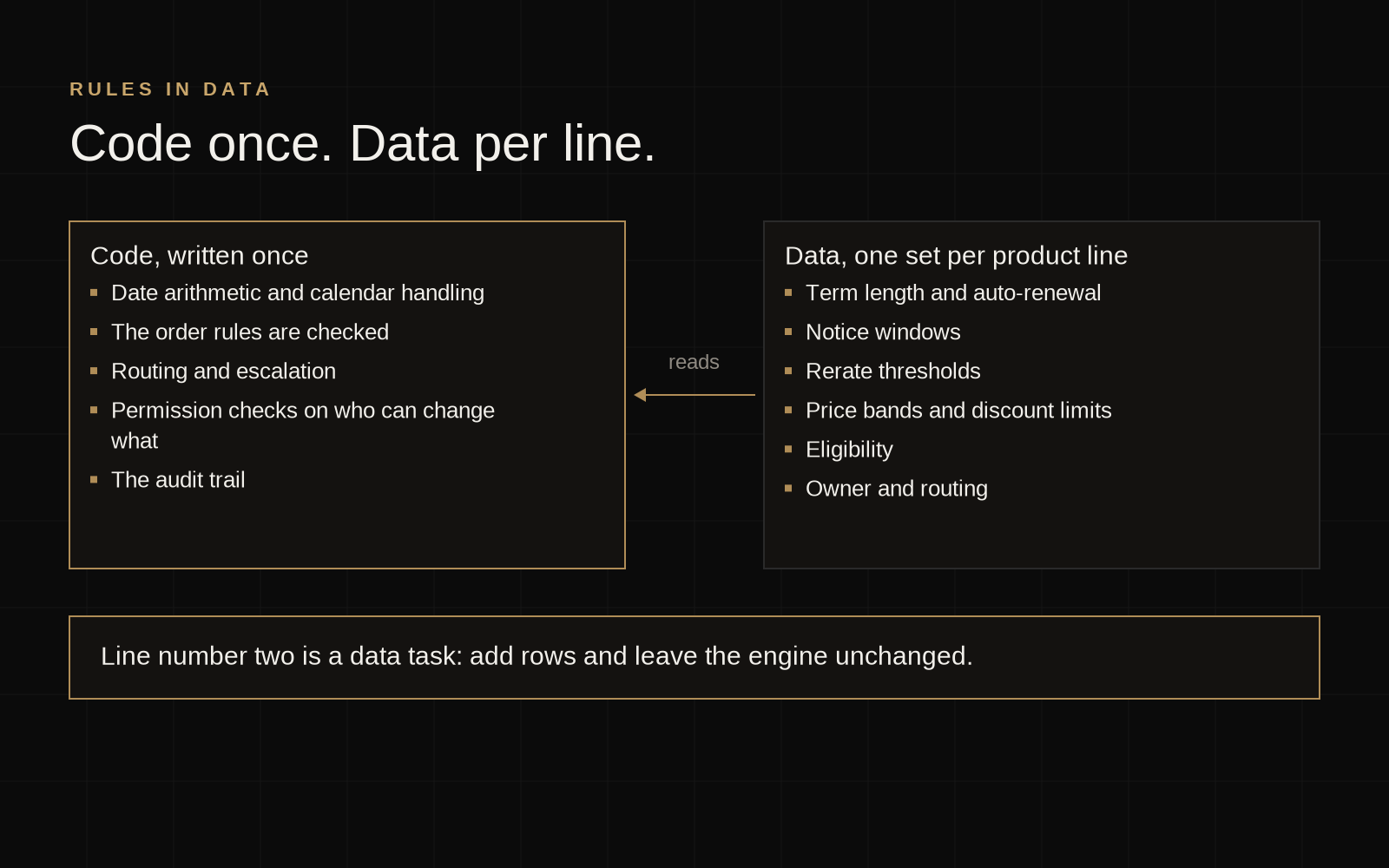
To manage pricing and renewal rules across many product lines, build the pattern once in code and hold each product line's specifics in data. The code knows how a renewal works in general: find the date, check the rules, route to an owner. The data says what is true for each product line. Then the second product line is configuration, and the thousandth is too.
If you are the CTO or the head of revenue operations, you own the cost and speed of changing a price or a term. This guide shows what belongs in data, how to govern changes, and how to test rules before they reach a customer.
The pattern and the specifics
Every product line has its own contract terms, notice windows, price bands and eligibility rules. A team that writes each line's rules into code ends up with one code path per line. Each new line adds code to write, test and maintain, and each rule change needs an engineer.
The alternative is to separate two things.
- The pattern. What every renewal has in common: read the contract date, apply the notice window, check the price against the band, identify the owner, route the event, record the outcome. This is written once, in code, and tested thoroughly.
- The specifics. What differs by product line: the term length, the notice period, the rerate threshold, who is eligible, who owns the line. These are held as rows in tables.
I used this approach at Level 3 and Lumen. The enterprise sales platform I architected went from $0 to $500 million in four years, and its renewal systems spanned more than 1,000 product lines. The rules for each line were held in data instead of code. I built the first version myself, then hired and led the team that scaled it.
The design goal is that line number two is a data task. Adding a product line means adding rows to tables, with the engine unchanged.
What belongs in data
Anything that differs by product line, customer segment or date belongs in a table. Use this list as a starting point.
| Rule type | Examples of what to store | Owner |
|---|---|---|
| Terms | Standard term length, auto-renewal setting, cancellation conditions | Product or contracts lead |
| Notice windows | Days of notice required, the day the window opens and closes | Contracts lead |
| Rerate thresholds | The price gap or date that triggers a price review | Pricing lead |
| Price bands | List price, floor, discount limits by role | Pricing lead |
| Eligibility | Which customers qualify for which offers | Product lead |
| Routing | Which role owns the event, the due date, the escalation path | Sales operations |
Each row carries three more fields: an effective date, a status (draft, active, retired) and the name of the person who approved it.
What stays in code
Code holds the logic that is the same for every line.
- date arithmetic and calendar handling
- the order in which rules are checked
- the routing and escalation mechanics
- permission checks on who can change what
- the audit trail
If you find yourself adding an "if product equals X" branch to the code, stop and ask whether that rule should be a row in a table.
How to move rules out of code
For a company that already has product-line rules scattered through code and spreadsheets, follow this sequence.
- Inventory. For each product line, list every rule that affects a price, a term or a renewal event. Note where each lives today: code, spreadsheet, contract or a person's memory.
- Find the common shape. Group the rules into types. Most companies find five to ten types cover nearly everything.
- Design the tables. One table per rule type, with the fields from the table above and a clear key (product line, segment, effective date).
- Write the engine. Code that reads the tables and applies the rules in a fixed order, with no product-specific branches.
- Load one product line. Pick a line with a well-understood rule set. Check the engine's output against what people produce today.
- Load the second line using data only. If this needs a code change, the pattern is incomplete. Fix the pattern, then continue.
- Move the rest in batches, starting with the largest lines by revenue.
Step six is the real test. If the second product line loads with data alone, the design works.
Governing changes to the rules
Once rules are data, anyone with access could change a price or a term. Governance keeps that power safe.
Who can change what
Give each rule type a named owner and limit write access to that owner and a named deputy. Pricing rules are changed by the pricing lead. Notice windows are changed by the contracts lead. Engineers do not change business rules in production.
Effective dates
Every rule change takes effect on a date. A change entered today with an effective date next month applies only from next month. Quotes and renewals created before that date use the old rule. This lets teams stage a price change and removes the fear of a surprise.
History
Never overwrite a row. A change creates a new row with a new effective date and retires the old one. That gives you a complete history, and you can answer the question "what rule applied to this renewal on this date" years later.
Approval
A change to a draft row needs approval from a second person before it becomes active. Decide by rule type who approves. A change to a price floor deserves an executive's sign-off, and a change to an internal routing rule may need only a manager's.
| Control | Rule | Why |
|---|---|---|
| Named owner | One owner per rule type | Someone answers for each rule |
| Second approver | Required for activation | Catches typing errors |
| Effective date | Required on every row | Stops surprises, supports staging |
| No overwrites | New row for each change | Keeps the history |
| Change log | Who, what, when, why | Supports audit |
Testing rules on known cases
Rules in data need tests, just as code does.
- Build a set of known cases. Collect 50 to 100 real past renewals and quotes where you know the correct outcome. Include the unusual ones, such as the account with a special term or the product line with a long notice window.
- Run every rule change against the set. Before a changed row goes active, run the engine over the known cases and compare the results to the expected outcomes.
- Review every difference. A difference is either a mistake in the new rule or a case that needs updating. Resolve each one in writing.
- Grow the set. Every time the engine gets a case wrong in live use, add that case to the set.
- Run the set on every code change too. The pattern must keep producing the same answers.
This is the same discipline we apply to AI knowledge systems, which must pass a test suite of real questions with known answers before launch. The pillar guide on renewal and upsell systems shows where these rules sit in the whole system.
Where AI fits
AI is useful for loading the tables. It can read existing contracts and price sheets and propose the rows: term length, notice period, thresholds. A person reviews each proposed row before it becomes active.
The engine itself stays deterministic. For pricing and eligibility, the same inputs must give the same answer every time, and a language model should not decide them. The guide on AI for quoting and approvals draws the same line between drafting and deciding.
What goes wrong
- Special cases creep back into code. Each exception added as a branch makes the next one easier to add. Insist that exceptions are rows with an owner and an expiry date.
- No effective dates. Without dates, a change applies to everything at once, including work already in flight.
- Anyone can edit. Open write access leads to untraceable changes. Limit access by rule type.
- No tests on rule changes. A wrong notice window sits quietly until a renewal slips past it. Run the known cases before each change goes active.
- Rules are loaded and never reviewed. Prices and terms drift. Put a review date on every row, and report the rows past due.
Questions leaders ask
How many product lines justify this approach?
The pattern pays off as soon as you have more than a handful of lines with different rules, and the payoff grows with each line. At 1,000 lines, code-per-line stops being practical. Even with five lines, tables with owners and effective dates beat rules scattered across spreadsheets.
Can business users edit the tables directly?
They can, once access control, approval and effective dates are in place. The owner of each rule type edits or proposes, a second person approves, and the engine applies the row only from its effective date.
What do we do with exceptions for individual customers?
Store each as a row scoped to that customer, with an owner, a reason and an expiry date. Review the list of exceptions on a calendar. An exception with no expiry date becomes a permanent rule that nobody remembers approving.
The Leverage Diagnostic takes about six minutes, scores the six places leverage hides and prices the gap with the math shown. Take the Leverage Diagnostic to see where rules held in people's heads are costing you revenue.