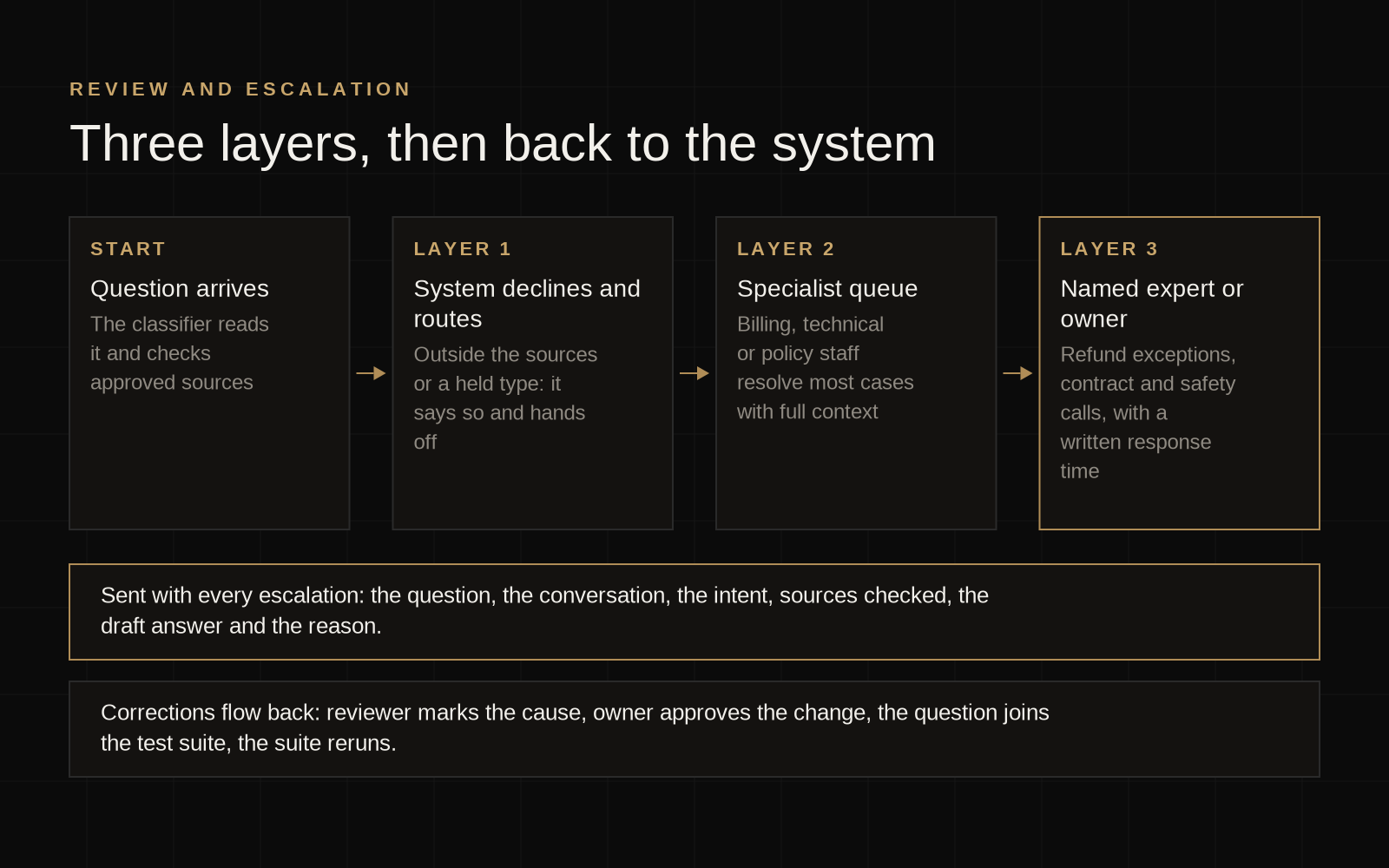
Design human review and escalation before you build the answers. At launch, a person reviews every AI answer. Autonomy then grows per question type, only with evidence. Questions the system should not answer travel through three layers of escalation: the system declines and routes, a specialist queue takes the case, and the named expert or owner settles what remains. Each correction flows back as approved guidance.
If you are a head of support or operations, you own the quality of what customers receive and the workload of your people. Review and escalation decide both. This guide covers each piece and gives a procedure for the first month.
Humans first at launch
For one client build, humans reviewed every answer at launch. The system had already passed a 370-question suite with zero errors, and review still came first. The suite tests what you thought of. Review finds what you did not.
Review at launch does three jobs:
- It catches errors before they spread.
- It produces the first evidence on which question types are safe to lighten.
- It gives your people a part in the system's improvement, so they treat the corrections as their own work.
Plan for the volume. Every answer reviewed means review hours in your staffing for the first weeks, and the hours shrink as evidence accumulates.
How autonomy is earned
Autonomy belongs to a question type, and the evidence for it comes from reviewed answers of that type. A system can be ready for password questions long before it is ready for refund exceptions.
| Stage | What happens | Move to the next stage when |
|---|---|---|
| 1. Full review | A person approves every answer of this type before the customer sees it | A defined run of answers has gone through with no corrections |
| 2. Sample review | The answer is sent, and a person reviews a sample afterward | The sampled answers stay clean over a defined period |
| 3. Monitored autonomy | The system answers alone, and the weekly test run and an alert watch quality | A correction or test failure sends the type back to stage 1 |
You set the numbers for "a defined run" and "a defined period" in advance, in writing, per type. Types involving money, legal exposure, safety or personal data keep a stricter bar and may stay at stage 1 permanently. That is a design choice, and the system still handles them by drafting for the person who decides.
The three layers of escalation
Escalation exists because some questions should reach a person. The design question is where each one goes.
Layer 1: the system declines and routes
The intent classifier reads the question. If it falls outside what the approved sources cover, or matches a type held for review, the system says so plainly to the customer and routes it. This layer needs clear refusal wording and a reliable handoff to a person.
Layer 2: a specialist queue
The routed question lands in a queue for people who handle that type: billing, technical, policy. They see the full context and resolve most cases. Staff in this queue also supply the corrections that improve the system.
Layer 3: the named expert or owner
Some cases need a decision from the person who owns the policy or the account: a refund exception, a contract question, a safety matter. The queue escalates to that named person, with a response expectation written down.
Write each layer's owner, response time and fallback when that person is out.
What context travels with an escalation
An escalation that makes the customer repeat themselves wastes the time the system saved. Send these with every one:
- The customer's original question, in their words.
- The conversation so far.
- The intent the classifier chose and how confident it was.
- The sources it checked, with owners and dates.
- The draft answer, if one exists.
- The reason for escalating, in one line.
- Relevant customer or order details the person is allowed to see.
The receiving person should be able to act in under a minute. Test this with your own staff before launch.
How corrections flow back
Every correction is a chance to protect the next customer. The loop works like this:
- The reviewer corrects the answer and marks the cause: wrong source, missing source, conflicting sources or wrong classification.
- The source owner approves any change to a source or an instruction. The change is dated.
- The corrected question joins the test suite with its verified answer.
- The suite runs in full. The change releases only if it passes.
- The reviewer sees the system give the corrected answer, which closes the loop.
The correction becomes approved guidance and no longer lives in one person's memory. This is how a repeated mistake gets fixed once. The keeping company knowledge current guide covers the owner and date discipline behind step 2.
A first-month procedure
- Week 1. List your question types. Mark each as answer, review or escalate. Name the owner and response time for each escalation layer.
- Week 2. Build the review screen or queue and the escalation context package. Test it with five staff members on historical questions.
- Week 3. Run the test suite, fix failures and set the written bar for moving each type between stages.
- Week 4. Launch with full review on every type. Track corrections by cause and by type.
- Day 30. Decide which types move to stage 2, which stay at stage 1 and what the escalation data says about missing sources.
This matches the rhythm of the 30-Day Leverage Pilot: build and test in week three, live with humans first in week four, and a day-30 decision.
What goes wrong
- Review becomes a rubber stamp. Reviewers click approve to clear the queue. Sample the reviewers: seed known wrong answers and check that they get caught.
- The classifier sends everything to layer 1. Customers feel stonewalled. Watch the escalation rate by type, and fix the sources behind the common ones.
- No owner for layer 3. Cases sit. Name a person and a fallback.
- Corrections stay in chat. The same mistake returns next week. Use the correction loop above.
- Autonomy granted by feeling. A type moves to stage 3 because it seems fine. Require the written evidence.
Questions leaders ask
Will review make the system too slow for customers?
Review time at launch is real, and you control it through volume per type and staffing. The speed gain arrives as types earn lighter review. The first weeks trade some speed for evidence.
How many reviewers do we need?
That depends on your volume and the time a review takes. Measure review minutes per answer in week two and multiply by expected answers per day.
Can the system escalate on its own judgment?
It should escalate by rules you wrote and tested: intent type, missing sources, conflicts, confidence and the customer's request for a person. The rules live in code, and the test suite checks them.
What do we tell customers when we escalate?
Say plainly that a specialist will follow up, and give a time. Customers accept a handoff that comes with a promise they can hold you to.
Read the overview in AI Knowledge Systems for Customer Support for how review and escalation fit with sources and governance.
The 30-Day Leverage Pilot puts this design live with humans first in week four, on one workflow, with a clear decision at day 30.