You add AI to a legacy system by building around it. Start with read-only access, put a knowledge layer beside the system of record, send events out to the AI, accept approved actions back in, and require human approval before anything is written. The legacy system keeps doing what it does well, and the AI gets the context and the reach it needs.
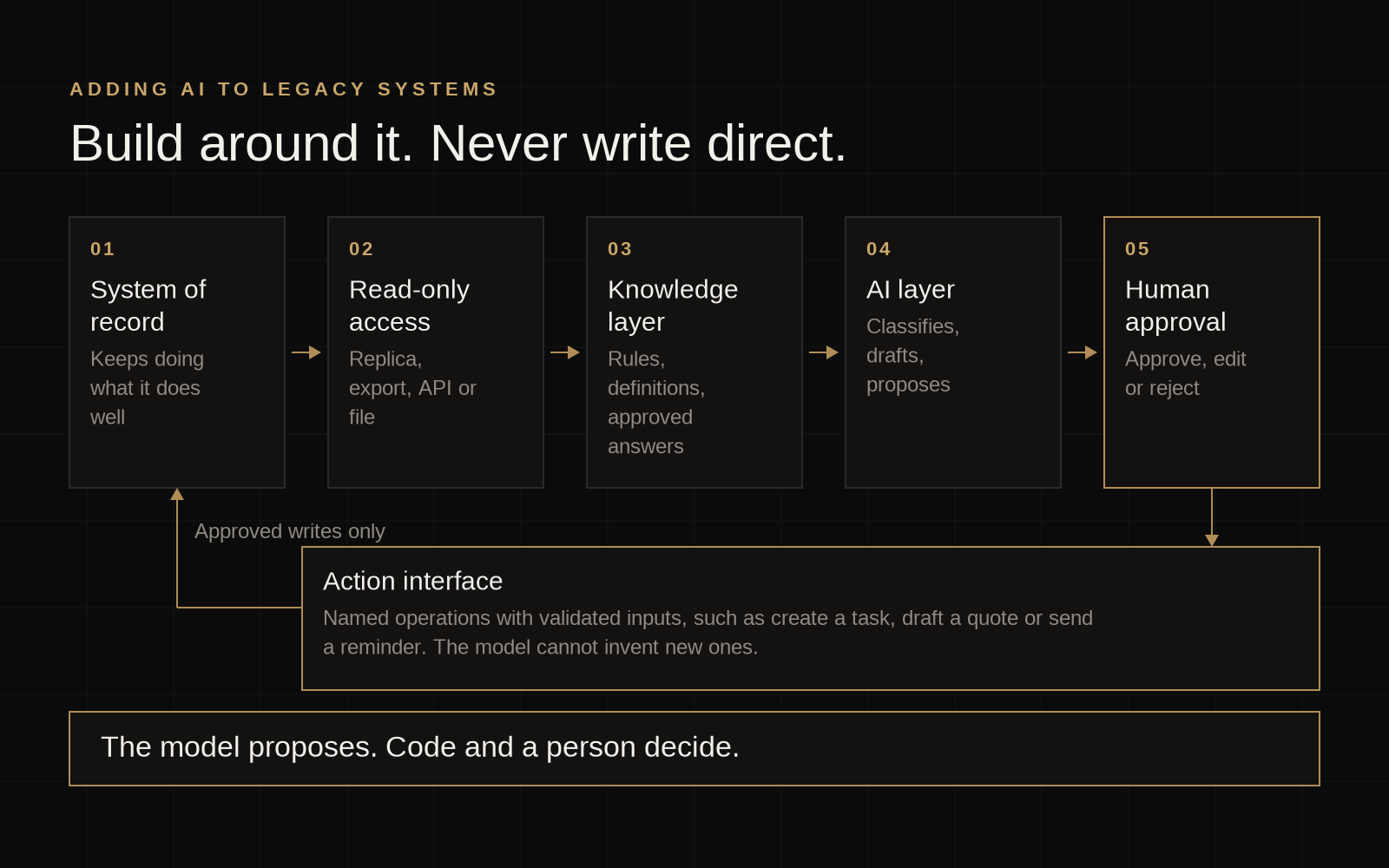
This guide is for the CIO or head of engineering who owns a stack that cannot be replaced this year or next. The number you own is the cost and risk of every change to systems that run the business. Good patterns keep that number flat while AI value grows.
Why most companies are in this position
Most mid-market and enterprise companies run on systems that have worked for years: an ERP, a billing platform, a CRM with a decade of customization, an order system written long ago. Replacing them is a large, risky project that rarely pays for itself inside an AI program's time frame.
I have spent more than 20 years in enterprise software, much of it inside systems like these. At Slalom Consulting I contributed to the full rebuild of Vail Resorts' legacy rental platform. At Allstate I spent six years on full-lifecycle enterprise application delivery. At Hitachi Consulting I worked on mission-critical portal software. In systems like these, the old platform holds the truth, and the work around it is where AI can help.
AI does not need to replace that system. It needs access to what the system knows and a safe way to act on what it learns.
Four patterns that work
1. Read-only access first
Begin by letting the AI read. Connect through whatever the legacy system exposes: a reporting database replica, an export, an API or a scheduled file. Do not touch the production write path.
Read-only access is low risk and still useful. The AI can answer questions, summarize accounts, flag anomalies and prepare drafts for people. You learn which data is clean and which is a mess, which is information you would need anyway.
2. A knowledge layer beside the system of record
Legacy systems hold records, and the meaning of those records lives in people's heads and in scattered documents. Build a knowledge layer next to the system of record. It holds the rules, the history of decisions, the product definitions and the approved answers.
Every fact in the layer has a source, an owner and a date. History is separated from current truth, so the AI does not quote a policy that was retired. Access follows your rules. This is the structure of a company brain, and it sits beside the old system rather than inside it.
3. Events out, approved actions in
Let the legacy system tell the AI when something happens: a renewal date approaches, an order is held, a case is opened. Events flow out through whatever mechanism the system supports, such as a change feed, a queue or a polling job.
When the AI proposes something, it goes in through a narrow, defined door. Each action type, such as "create a task," "draft a quote" or "send a reminder," is a named operation with validated inputs. The AI cannot invent new operations.
4. Human approval before any write
Anything that changes the system of record passes through a person first. The person sees what is proposed, why, and which sources support it. They approve, edit or reject.
As the record builds, you can relax approval for action types with a long clean history. Keep the audit trail on every action, whether a person approved it or not.
How the pieces fit
| Layer | Role | Who or what touches it |
|---|---|---|
| System of record | Holds the truth, runs transactions | Existing staff, existing integrations |
| Read connection | Feeds data to the AI layer | Service account with read-only rights |
| Knowledge layer | Rules, definitions, approved answers, history | Knowledge owners, AI layer |
| AI layer | Classifies, retrieves, drafts, proposes | Model plus code guardrails |
| Approval queue | Shows proposed actions to people | Reviewers |
| Action interface | Executes approved actions | Narrow, validated operations only |
| Audit trail | Records everything | Security, operations, owners |
What to avoid
Bulk migration before value
A common first instinct is to move all the data into a new platform so the AI can use it. That is a large project with a long wait and no return until it finishes. Connect to the data where it lives, prove value on one workflow, and migrate only what that workflow requires.
Letting a model write directly to the system of record
A model can propose, and code must decide. A model that writes straight into production data can produce a plausible, well-formatted wrong record, and the system will accept it. Put an approval and a validation layer between every model and every write.
Rebuilding the business rules in the prompt
Teams copy pricing rules and eligibility logic into a prompt. The rules then live in two places and drift apart. Keep rules in data or code where they can be read, versioned and tested, and let the model call them.
Sequencing: a procedure for the first 90 days
- Pick one workflow where the legacy system is a bottleneck, such as a manual lookup, a renewal check or a status question. Name the number it moves and the owner.
- Inventory how to read the data: replica, export, API or file. Choose the safest option that gives fresh enough data.
- Create a read-only service account with the narrowest rights that work.
- Build the knowledge layer for that workflow only. Assign a source, an owner and a date to each fact.
- Build a test suite of real cases with known answers. Set the pass bar.
- Launch read-only with people reviewing every output.
- Add one event feed, then one approved action type, with human approval on each.
- Review the audit trail weekly. Relax approval one action type at a time.
- Choose the next workflow and reuse the knowledge layer, the account model and the approval queue.
The controls in the pillar guide on engineering AI for production apply at every step.
A note on the sales platform
At Level 3 Communications and Lumen Technologies, I architected the enterprise sales platform that went from $0 to $500 million in four years. It handled renewal systems spanning more than 1,000 product lines, with the rules for each product line held in data instead of code. That separation of rules from code made it possible to change behavior without rewriting the system, and the same idea is the foundation of the knowledge layer above.
What goes wrong
- Write access granted early. A proof of concept gets production write rights for convenience and keeps them.
- The data is worse than assumed. Duplicate accounts and stale fields surface once the AI reads them. Plan time for cleanup in the first workflow only.
- Integration owners are missing. The one person who understands the legacy interface is not on the project. Name them in week one.
- Load on the legacy system. The AI queries the production database at peak hours. Use a replica or a schedule.
- Rules scattered across tools. Some rules live in the legacy code, some in spreadsheets and some in heads. Collect them into the knowledge layer with owners.
- Approval fatigue. Reviewers rubber-stamp a long queue. Keep the queue small by narrowing what the AI proposes, and sample review quality.
- No path back. A change cannot be reversed. Every action type needs an undo or a compensating step defined before launch.
For the program view, including how pilots reach production, see the guide on moving from AI pilot to production.
Questions leaders ask
Do we need to modernize the legacy system first?
Usually no. Connect to it as it is, prove value on one workflow and modernize on the schedule you already planned. AI can make the case for modernization with evidence, and it does not depend on it.
What if the legacy system has no API?
Look for a reporting replica, a scheduled export, a database view or a file drop. Read-only access through one of these is often enough for the first workflow. Screen-level automation is a last resort and needs extra monitoring.
How do we stop the AI from changing the wrong thing?
Give it no write path. Actions go through named operations with validated inputs, behind a human approval step, with an audit trail. The model proposes and the code and the person decide.
How long before we see value?
The first read-only workflow can go live with humans reviewing in a matter of weeks when the scope is one workflow. The value arrives as time saved on the number you chose, and approval relaxes as the record supports it.
If you want a view of where the biggest constraint sits in your stack before you commit to a pattern, the Leverage Diagnostic takes about six minutes, scores the six places leverage hides and prices the gap with the math shown. Start with the Leverage Diagnostic.